 DACP
Submit streaming jobs to DACP
The shared YAML fields, port bindings, source steps and execution semantics are defined in the XStream Job reference. This guide covers DACP Shell/SDK submission, Union integration and service credentials.
sequenceDiagram
  participant Client
  participant Service as Node or Union
  participant Engine as Local engine or member subjobs
  Client->>Service: Submit Job + variables + policy
  Service->>Service: Authenticate and plan
  Service->>Engine: Execute stream-connected steps
  Engine-->>Service: Output stream and attempt events
  Service-->>Client: Incremental results
  Client->>Service: Cancel when requested
Shell
submit job.yaml
submit job.yaml --vars variables.yaml
run piflow_filter@2.0 --input source=/observations --view records --params '{"condition":"CAST(quality AS INTEGER) = 0"}'
run piflow_csv_parser@2.0 --input source=/observations --view bytes
The shell converts Item inputs into item_source steps and prints results incrementally. It connects to either a node or Union using TLS and a token. Repeat --output PORT to select multiple ports, or use --no-output for a sink. Remote shell jobs use public repository operators.
Workflow variables
Supply variables in a separate YAML file when submitting a workflow, without editing the template. Its root must be a mapping, for example VAR_NAME: 123; numbers, booleans and lists retain their types.
Write a complete value as $VAR_NAME in the workflow:
params:
  limit: $VAR_NAME
  schema: $SCHEMA
The matching variables.yaml is:
VAR_NAME: 123
SCHEMA:
  temperature: float64
In a shell already connected to the server, run:
submit workflow.yaml --vars variables.yaml
submit workflow.yaml --vars variables.yaml --policy policy.yaml
Interactive input also works: run submit --vars variables.yaml, enter the workflow, and finish with END alone on a line. A complete conversion example is provided:
submit examples/convert-variables.yaml --vars examples/convert-variables-values.yaml
Paths are relative to the shell's working directory. Change INPUT_URI in the variable file to an Item URI accessible to the target server and ensure the referenced operators are available.
Variable names are case-sensitive and match [A-Za-z_][A-Za-z0-9_]*. When a variable object is supplied, the client parses YAML and recursively substitutes complete string values, preserving numbers, booleans, strings, lists, mappings, and null, then submits the resolved workflow. Mapping keys are unchanged; prefix-$VAR_NAME is not interpolated; $OTHER inside an inserted value is not expanded again. Environment variables are not read and Shell commands are not executed. Missing variables or invalid variable files fail before submission; unused variables are allowed. Supply --vars or the SDK variables argument when the Job contains variable references.
The Python SDK accepts variable dictionaries for both node and Union submissions:
import yaml
from pathlib import Path
from dacp import Job

workflow = Path("workflow.yaml").read_text()
variables = yaml.safe_load(Path("variables.yaml").read_text())
with Job.run("dacp://localhost:18861", workflow, variables=variables) as result:
    for event in result:
        print(event)

# union is an already connected dacp.union.Union instance
execution = union.submit(workflow, variables=variables)
The Scala SDK uses the same rules:
import dacp.client.Job
import com.fasterxml.jackson.databind.ObjectMapper
import java.nio.file.{Files, Path}

val workflow = Files.readString(Path.of("workflow.yaml"))
val variables = dacp.union.YamlDocument.parse(Files.readString(Path.of("variables.yaml")))
val result = Job.run("dacp://localhost:18861", workflow, variables = variables)
try result.foreach(println) finally result.close()
// union is an already connected dacp.client.Union instance
val execution = union.submit(workflow, variables = variables)
The client reads the variable file; it need not exist on the node filesystem. The server records and executes the resolved workflow, so automatic whole-Job retries retain the original resolved values. Submit a new workflow to use new values. Resolved values may appear in job history and dashboards, so do not put passwords or other secrets in variables.
Workflows, execution policies and variables use YAML and can be submitted together:
submit workflow.yaml --policy policy.yaml --vars variables.yaml
Union subjobs retain the global job’s name. Node and Union dashboards share Name, Job ID, Source, Type, Status, Started at and Duration columns. Names lead the list, while details retain the full ID. Subjob definitions and execution policies display as YAML. YAML documents are limited to 1 MiB and reject duplicate keys, unsafe object tags and collection aliases. Quote textual numbers, dates and boolean labels.
When item_source.view is omitted, Item metadata selects records, then bytes, then the first available scientific view. An explicit choice is preserved and fails if unsupported.
Item paths, remote services and SQL
name: hot-weather-observations
steps:
- id: read
  operator: item_source@1.0
  inputs: {}
  params:
    uri: context:/ds-6zmr-crvh/observations
    sql: |
      SELECT station_id, temperature
      FROM source
      WHERE temperature > 30
      LIMIT 100
- id: client_sink
  operator: client_sink@1.0
  inputs:
    result: read
For an explicitly addressed service, use uri: dacp://remote.example:18861/weather/observations. A context: URI refers to the DataCatalog bound in the receiving JVM; it is resolved before remote dispatch. Paths address the submission target’s public directory: a node resolves local names, while Union resolves its public names and schedules readers on the owning members. Authors need no internal member addresses.
For item_source parameters, SQL syntax, supported predicates and inference behavior, see the XStream Job reference and record scan reference.
Configure remote credentials on nodes that actually execute reads and separately on the designer. The target service’s token is never forwarded to another service; credentials are not Job parameters. Every member eligible to read an external service should have its required credentials.
remote_item_credentials:
  "dacp://remote.example:18861": /etc/dacp/remote-reader.token
Scientific view selections and samples.
Steps support an optional multiline description of up to 8192 characters. It is retained in logical plans and dispatched sub-jobs without changing execution semantics. Edit it in the Designer Step tab; see the XStream Job guide for the full syntax.
Inspect the submitted Job visually
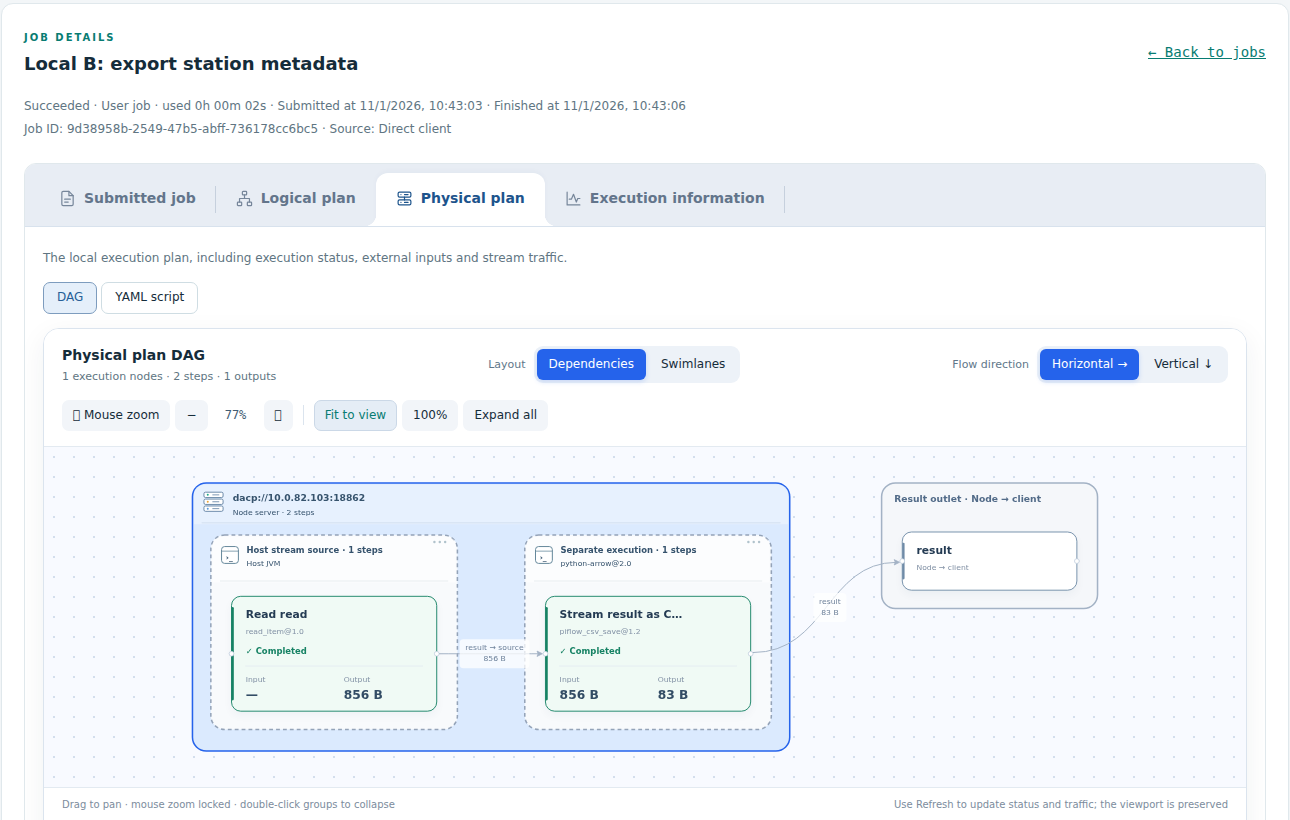
After submission, open the Job detail page from the dashboard history. Compare the submitted Job and logical plan with the physical plan: server groups indicate execution locations and execution-unit groups indicate process boundaries. Use Execution information to inspect status and failures; the screenshot is an example rather than a required Job layout. See dashboard controls.
Physical plan generation and optimization · Extend planning optimization