 DACP
Dashboard and execution plans
Use the read-only node and Union dashboards on the internal network to inspect services and Jobs. The dashboards do not require login, consume Item streams or offer data downloads.
Find a page
| Page | What to inspect |
|---|---|
| Node overview | Service address, uptime, resources, execution capacity and Job history |
Data catalog (/datasets) |
Published Dataset names, descriptions and service URIs |
S3 service (/s3) |
Listener state, request counts and transferred bytes |
Job details (/job?id=...) |
Submitted script, plans, execution policy, attempts and step status |
Union members (/nodes) |
Member health, resources, Job participation and observed stream traffic |
Job lists show readable names and generated IDs, source, type, status, start time and duration. Select a Job to open its separate detail page. All dashboard pages load once when opened and do not refresh automatically; use Refresh or Reload when needed. This includes node and Union overviews, Job lists and details, S3 statistics, and member topology. Changing a filter or page, or expanding a dataset, may load the requested information. Node and Union use matching tabs and DAG controls. Dataset pages load asynchronously and expose incomplete/failing requests explicitly.
Read a Job detail page
| Tab | Question it answers |
|---|---|
| Submitted job | What did the client submit? |
| Logical plan | Which steps and stream connections define the computation? |
| Physical plan | Where does it execute, and which steps share an execution unit? |
| Execution information | What happened: policy, attempts, status, timing and failure details? |
The physical plan contains the complete plan and, on Union, dispatched subjob tabs ordered from upstream to downstream. Each plan has DAG and YAML script views. Placement annotations belong to the physical plan. Server groups identify execution locations; dashed unit groups identify process boundaries and runtime models. Step cards use the Designer’s white-card styling, named input/output ports, curved connections and compact status indicators. Card height follows the number of connected ports. Input/output payload totals appear in a compact footer; select a card or connection for complete metadata and traffic details. Missing observations appear as —.
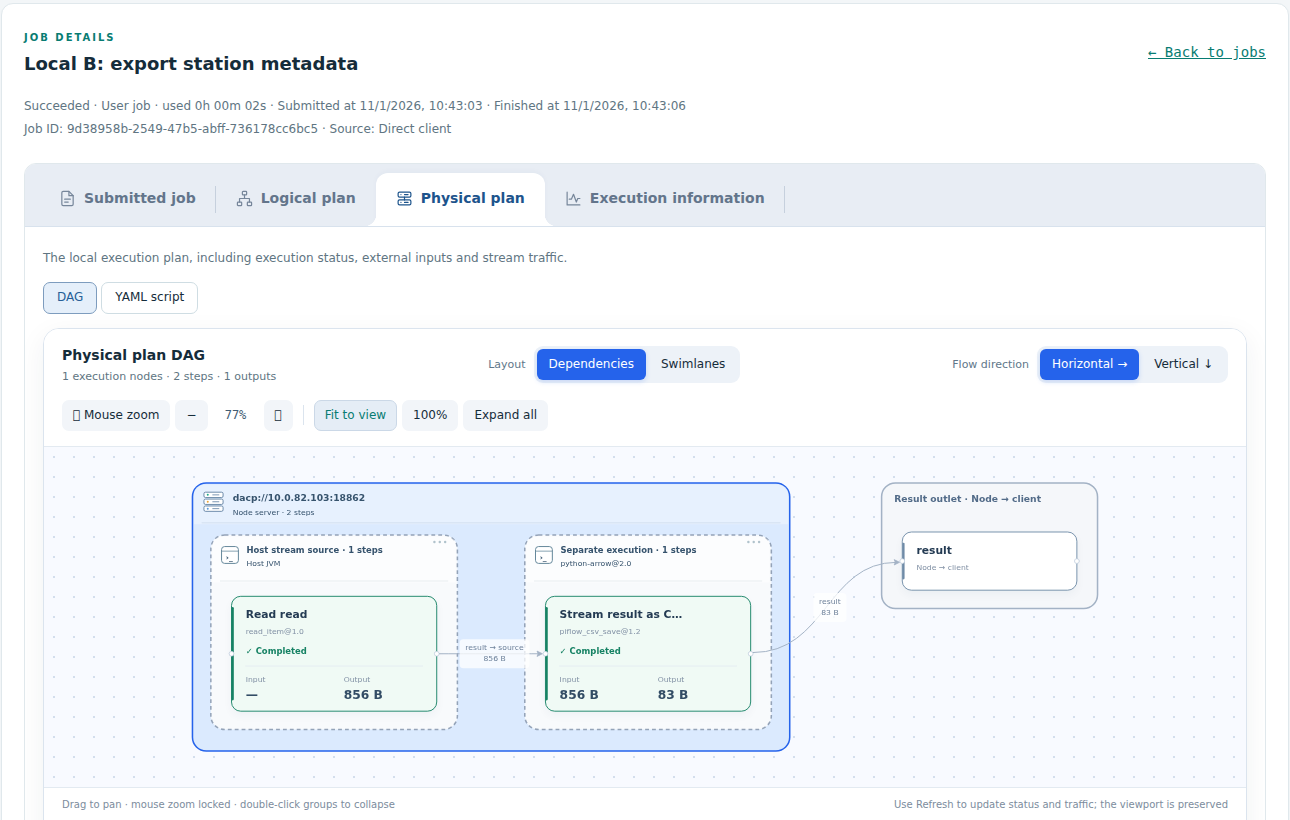
A Union-assigned subjob is the plan dispatched to that node. Its external inputs identify upstream outputs outside the local execution area. Use Union's detail page for the complete logical Job and its global plan. A node's direct client Job shows its submitted definition and local plans.
DAG controls
Switch between dependency and swimlane layouts and choose horizontal or vertical direction. Select a step or edge to highlight it. Toolbar controls offer zoom, fit, reset and expand. Mouse-wheel zoom is locked by default; the wheel scrolls the page while locked. Unlock Mouse zoom to zoom with the wheel. Horizontal layouts align server and unit heights; vertical layouts align widths.
Dependency layouts preserve parallel branches and upstream-to-downstream layers inside each server. Execution-unit frames are sized before server frames; sibling frames are separated using their actual bounds. Equal dimensions do not force all execution units into a single row or column. Expanding groups recalculates spacing from their contents, so presentation padding does not accumulate. Connections use smooth curves where clear and rounded obstacle-avoiding routes when another step card obstructs the curve.
Execution sources and internal routing
The list distinguishes Direct client / Union sources and User job / Union sub-job types. Source filtering applies before pagination. Only top-level Jobs occupy list rows; associated step records appear in details and retain attempt numbers.
For dashboard integrations, /api/history?source=client or ?source=union filters source; omitted or all returns all top-level Jobs. /api/executions/<record_id> includes step_records. Source is derived from server execution records. Subjob YAML preserves the actual assigned definitions, remote inputs and output routes; identity digests authorize stream consumers and are not data representations.
Data catalog
/datasets shows local Dataset names on a node and public Union names on Union. It offers text filtering, refresh and JSON descriptions. Loading metadata does not open Items or submit Jobs. See directory semantics for incomplete catalogs and member-local names.
For operational metrics, S3 status and dashboard listeners, see monitoring and dashboard configuration.
Copy YAML
YAML areas for submitted Jobs, logical and physical plans, Union sub-jobs and execution policies provide a Copy button. Copying preserves the current text, newlines and indentation without toolbar labels or headings. After selecting another sub-job, copying uses the newly selected definition. Copied confirms success; if browser clipboard access is unavailable, select and copy the YAML manually. Internal HTTP dashboards also support a compatible copy fallback.