 DACP
User guide
Access published data remotely and run Jobs on a node or through Union. Start with the path matching your immediate task.
flowchart LR
  Goal["What do you need?"] --> Access["Access an existing service"] --> Shell["Shell or SDK"]
  Goal --> Compute["Run analysis"] --> Job["Submit a Job"]
  Job --> Result["Consume results and inspect plans"]
1. Connect and read
| Task | Tutorial and reference |
|---|---|
| First connection and first Item preview | Quick start |
| Shell commands and Python/Scala examples | Shell and SDK guide, Scala SDK |
| Discover published Datasets and interpret partial catalogs | Dataset directories |
| Filter, project and limit remote records | Record queries |
| Use S3 clients or share a temporary download | S3 access and presigned GET |
| Resolve access-denied errors or configure credentials | Roles and connection security |
2. Submit and inspect Jobs
| Task | Tutorial and reference |
|---|---|
| Submit with variables and receive live results | Remote Job submission |
| Set retries, timeout, whole-Job recovery | Execution policies |
| Inspect submitted Job, logical and physical plans, and execution details | Dashboard guide |
| Inspect execution records | Execution history |
| Run through a Union public namespace | Union data and Jobs, weather collaboration example |
| Compare local, distributed and materialized execution | Local versus Union, streaming versus materialization |
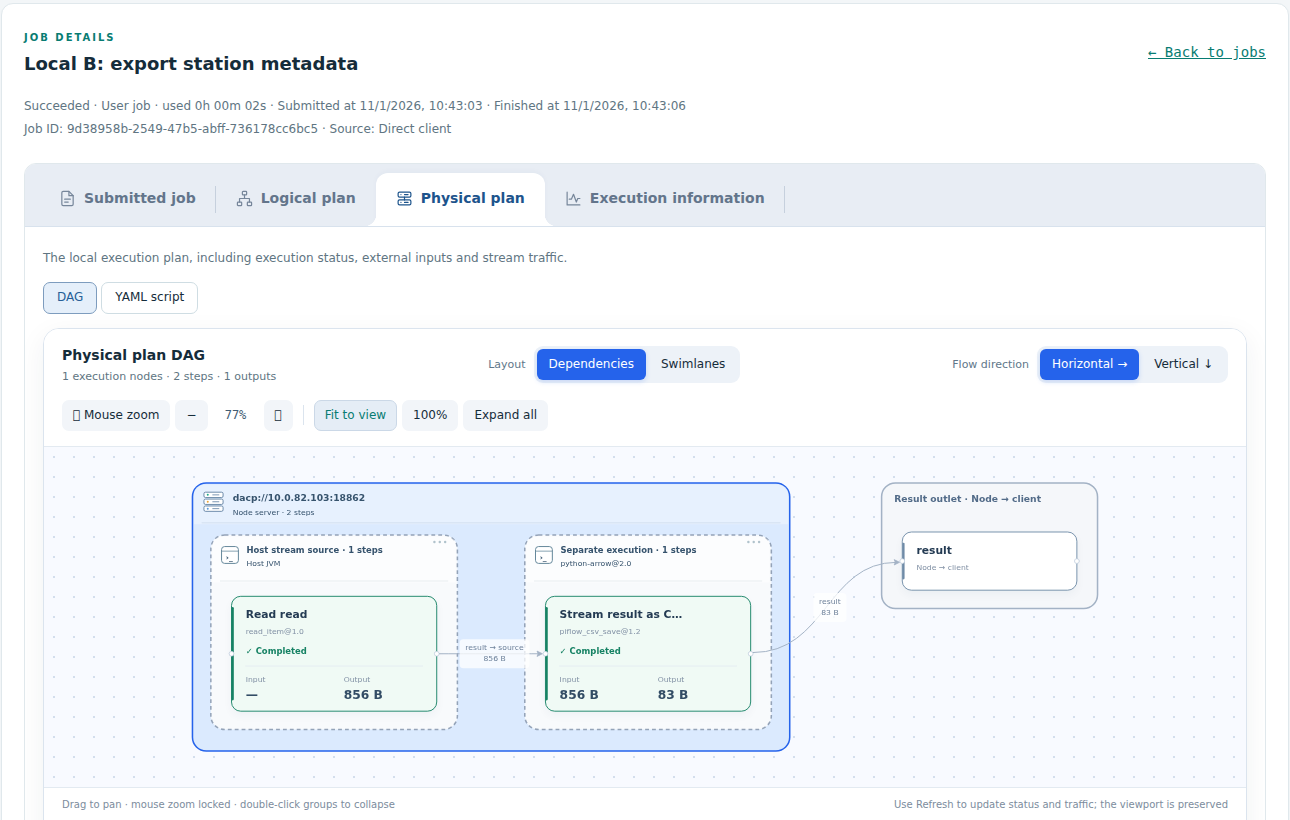
The same Job-detail tabs are used by node and Union dashboards. The physical plan identifies execution servers, units and their runtime environments.
For deployment, publication, security, monitoring and maintenance, use the Operations guide. For application integration, use the Development guide. Job authoring and operator development are covered by the XStream guides.